Receiving the Afi2Go Wand
The Afi2Go Wand is delivered in a protective casing. Before you can begin using the device, you must first insert the batteries and pair the Afi2Go Wand with your Afi2Go Prime application.
Add or Replace Batteries
The Afi2Go Wand is delivered without batteries. Before first use, 4X AA batteries must be correctly inserted.
Likewise, the batteries must be switched immediately if the battery power is too weak.
Caution: If the battery LED flash es red, this indicates the battery is too weak to work with and should be replaced immediately before continuing. The Afi2Go Wand will not work if the batteries are near empty.
To change the batteries
-
Unscrew the cap at the bottom of the Wand, then remove the battery pack.
-
After replacing the batteries, screw the cap back into place - make sure the markers line up.
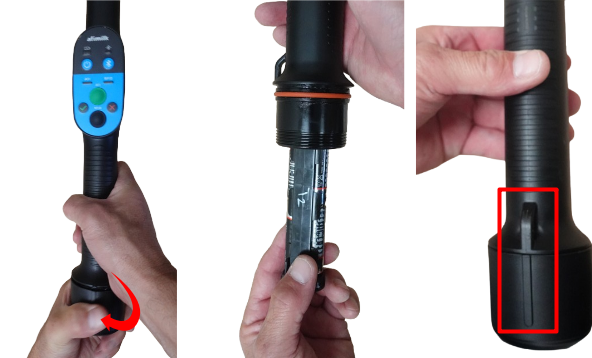
-
Confirm the batteries are at full capacity.
Pair the Afi2Go Wand with Afi2Go Prime
Note: In order to work with the Afi2Go Wand, you must have your Bluetooth turned on, and you must have the latest version of Afi2Go Prime installed on your phone. Make sure the Wand Support is activated in the application Settings.
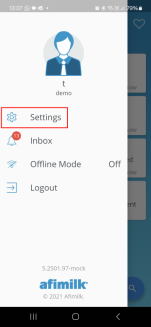
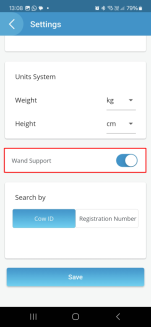
-
Hold down the power button
 until you hear a beep.
 Confirm the battery light turns ON.
-
Press the Bluetooth button
 to pair the device with your mobile phone.
The blue light flashes, until it's connected.
Note: Once you have pressed the Bluetooth button on the Afi2Go Wand it will automatically find and pair with your phone . DO NOT try pairing to the Afi2Go Wand from your phone.
